View Issue Details

IDProjectCategoryView StatusLast Update
0000458T99X171.00 SKB EagleHWpublic2019-05-17 11:01
Reporter(ALTech) SB ParkAssigned To(RD) Fu-chiang YoungDue Date2019-02-26 11:14
PriorityimmediateSeveritys1-catastrophicReproducibilityalways
Status closedResolutionfixed 
Summary0000458: SKB's test criteria of power consumption during normal operating state
Description1. Test condition
    1) setup : UHD Channel (73 ch at SKB network), USB load 5A/900mA
    2) After aging Eagle, measure teh power consumption ( accumulate data for 1 hour)

2. SKB request that the target consumption is under 2W at normal operation
TagsNo tags attached.
Attach Tags

Users monitoring this issue

User List (ALTech) BY Lee , (ALTech) Eric Kim , (ALTech) Jewoo Lee , (ALTech) Juyoung Park , (ALTech) Philip , (ALTech) SY Yoon , (HW) Jim Liang , (RD) Fu-chiang Young

Activities

(HW) Sean Chiang

2019-02-22 11:24

developer   ~0001176

If USB load 5V/900mA, the power consumption of whole system will be exceed 2W.
Please confirm if this condition is correct or not.

(ALTech) SB Park

2019-02-25 21:44

developer   ~0001199

According to Your report "Power consumption 20190222", there is no USB load and the result is 2.63W

(HW) Sean Chiang

2019-02-26 10:23

developer   ~0001200

So, SKB request USB to add load@900mA during the normal operation test? Is it correct?
And if the target power consumption is under 2W, based on above requirement, we should turn-off the USB power switch during the normal operation state, is it make sense?

(ALTech) SB Park

2019-02-26 10:46

developer   ~0001201

I have a question. as soon as the ext device is insert to USB port during 4K Streaming display, the USB power switch still off state?

(HW) Sean Chiang

2019-02-26 14:42

developer   ~0001202

no, the design scenario of USB power switch in EVT board is when plug in the 5V DC power, the USB power switch will always turn-on. The USB power switch has an enable pin but now it's linkage with system 5V.

(ALTech) SB Park

2019-02-26 15:32

developer   ~0001203

I discussed Mr Philip about power consumption.
1. measure power consumption without USB
2. measure power consumption with USB (optional)

(HW) Sean Chiang

2019-02-26 20:51

developer   ~0001206

1. Upload power consumption test report and add max. power consumption (add USB load@900mA) as item0 as attached.
2. Upload Amlogic DDR3 EVB power consumption test report "S905X2_U212_DDR3_Power Consumption_English"
We have discussed with Mr. Philip today and clarify the power consumption value that AML provided was measured at DC side instead of AC side.
We have verified again the DC power consumption for Eagle board and found the result is close to Amlogic's report.

(ALTech) SB Park

2019-02-26 21:37

developer   ~0001208

Thank you for your good job

(HW) Sean Chiang

2019-03-04 19:59

developer   ~0001304

Does SKB accept the power consumption @ 0.9709W DC port/ 1.35W AC port in standby mode ?

(ALTech) SB Park

2019-03-05 09:04

developer   ~0001310

Not yet. SKB always request that normal state is under 2W, active standby under 1W.
(besides AP does not work full function now.)
SKB want to check power consumption continuously. Of course it is difficult to reduce power consumption.
If you find some additional solution and update report, I will communicate about this

(HW) Sean Chiang

2019-03-05 22:10

developer   ~0001338

Hi SB,
Update booting time for AML EVB as attached report

(ALTech) SB Park

2019-03-06 10:25

developer   ~0001345

Hi Sean
Which point is developed to reduce power consumption?

(HW) Sean Chiang

2019-03-06 14:49

developer   ~0001354

We have worked with Amlogic to reduce the power consumption for following points in active standby mode. And so far we only can reduce around 0.1W
1. Reduce CPU/GPU to lowest speed (285MHz)
2. Turn off CPU core from Quad core to one core.
3. Reduce VPU to lowest speed (100MHz)

(HW) Sean Chiang

2019-03-06 19:27

developer   ~0001371

Hi SB,
Update power consumption/ booting time of passive standby for Eagle board as attached.

(ALTech) SB Park

2019-03-06 21:53

developer   ~0001380

Hi Sean
Good job.
but, I request to add the criteria, pass/fail at result. this request should be applied all report.

(ALTech) SB Park

2019-03-07 10:11

developer   ~0001386

Hi Sean
I reviewed the power consumption report.
You reduce 0.1W at active standby mode. but, the the value is still 1.35W in before reports and final report.
Is the final value is 1.25W? If you made report with wrong value, update the modfied report again

(ALTech) SB Park

2019-03-08 09:47

developer   ~0001412

SKB release the power consumption criteria
--------------------------------------------------------------------------------------------------------
normal operate : under 2W (without adapter)
active standby : under 1W (without adatper)
passive standby : under 0.2W (without adapter)
adater efficiency : udner 80% (full load condition with 900ma of USB)
--------------------------------------------------------------------------------------------------------

Your test result is almost pass at new SKB's criteria.
but, the SW and function is not completed. so you should check power consumption continuously
and I'll send SKB to EVT final report so please test 1hour accumulation

(ALTech) SB Park

2019-03-08 17:11

developer   ~0001419

Hi Sean

SKB request to check wakeup time from active stand to display screen.

(HW) Sean Chiang

2019-03-08 18:29

developer   ~0001421

Hi Fu-Chiang,
Please verify the wakeup time from active standby mode.

(ALTech) SB Park

2019-03-13 17:24

developer   ~0001505

Hi Sean
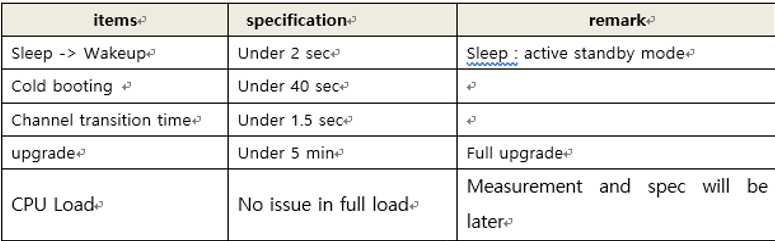
I saw your report. the wakeup time is about 5 second from active standby to display screen.
It is fail. see the below table
quality_standard_SKB.png (52,836 bytes)   

(ALTech) SB Park

2019-03-14 11:47

developer   ~0001520

Hi Sean
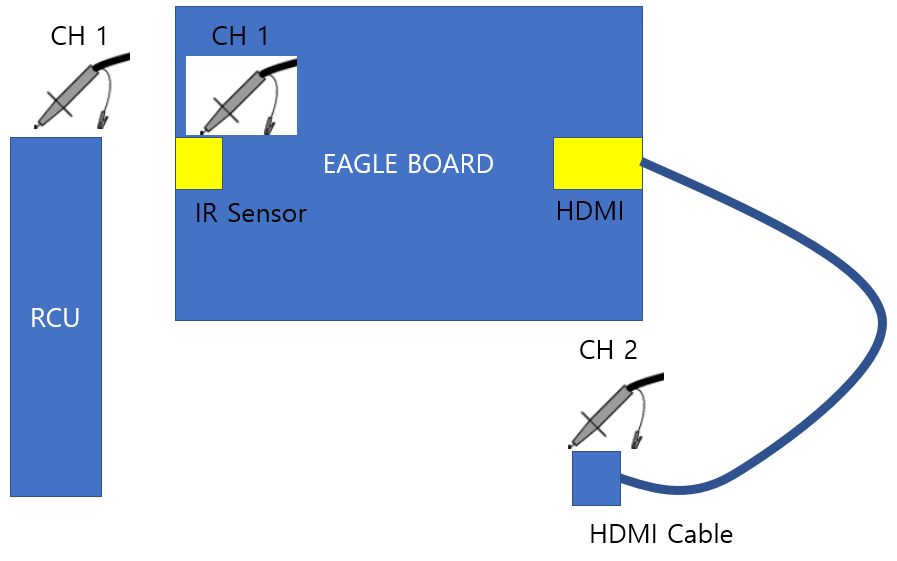
I suggenst you to check wakeup time from active standby mode to wake up. the spec is under 2s. so it is difficult to examine with stop watch.
Using oscilloscope, ch1 connect to RCU power button or IR receiver in Eagle, ch2 connect to HDMI TMDS data.
and you can measure the timing between IR starting point and HDMI data out. How about your opinion?
WAKEUP_SETUP.png (37,971 bytes)   

(HW) Sean Chiang

2019-03-15 11:11

developer   ~0001534

Hi SB,
I agree with your idea. This measurement method can avoid the human measurement error.
However, we found that there will have a delay time in TV side after HDMI send out the data. And this delay time may depend on different TV due to the processing speed difference inside the TV.
Anyway, we have measure the timing according to this method and update to the report.
Please check it and let us know your comment.

(ALTech) SB Park

2019-03-15 11:47

developer   ~0001536

Hi Sean
thank you for your effort.

according to SKB's RFP, Wakeup means that the user see the picture fo TV Screen.
If you set ch3 to HDMI clk and check wake up time, the user may not see the picture of TV during at that wakeup time.
In my opinon, delay time of TV side also added.

(ALTech) SB Park

2019-04-09 22:12

developer   ~0001933

Hi Sean
Do you check the wake up time?

(RD) Fu-chiang Young

2019-04-10 16:38

developer   ~0001967

Hi SB,
We check the latest FW version, BTV, that can meet the under 2 seconds wakeup time from active standby mode to normal mode.
The test results for 10 times are all in 2 seconds.
The previously FW version was google TV version without BTV APP, so that should be different to test wakeup time when google TV version was not ready for final FW version.
We add the test results of wakeup time to report, please see the attached file.
Thank you.

(ALTech) SB Park

2019-04-10 17:11

developer   ~0001969

Hi Fu-chiang Young
thank you for updating report

(ALTech) SB Park

2019-04-10 17:36

developer   ~0001970

Hi Sean
I update the HW test report list file. this is just my own document. see sheet2.

(HW) Sean Chiang

2019-04-10 17:57

developer   ~0001971

Hi SB,
Well received. Thanks.

Issue History

Date Modified Username Field Change
2019-02-22 10:32 (ALTech) SB Park New Issue
2019-02-22 10:32 (ALTech) SB Park Status new => assigned
2019-02-22 10:32 (ALTech) SB Park Assigned To => (HW) Sean Chiang
2019-02-22 10:33 (ALTech) SB Park Issue Monitored: (ALTech) SY Yoon
2019-02-22 10:33 (ALTech) SB Park Issue Monitored: (PM) Sheila Tu
2019-02-22 10:50 (HW) Sean Chiang Issue Monitored: (HW) Sean Chiang
2019-02-22 10:50 (HW) Sean Chiang Issue End Monitor: (HW) Sean Chiang
2019-02-22 11:24 (HW) Sean Chiang Status assigned => feedback
2019-02-22 11:24 (HW) Sean Chiang Note Added: 0001176
2019-02-25 21:44 (ALTech) SB Park Note Added: 0001199
2019-02-25 21:44 (ALTech) SB Park Status feedback => assigned
2019-02-26 10:23 (HW) Sean Chiang Note Added: 0001200
2019-02-26 10:46 (ALTech) SB Park Note Added: 0001201
2019-02-26 14:42 (HW) Sean Chiang Note Added: 0001202
2019-02-26 15:32 (ALTech) SB Park Note Added: 0001203
2019-02-26 15:45 (HW) Sean Chiang Issue Monitored: (RD) Fu-chiang Young
2019-02-26 15:46 (HW) Sean Chiang Issue Monitored: (HW) Jim Liang
2019-02-26 20:51 (HW) Sean Chiang File Added: Power Consumption_20190226_900mA_load.pdf
2019-02-26 20:51 (HW) Sean Chiang File Added: S905X2_U212_DDR3_Power Consumption_English.xls
2019-02-26 20:51 (HW) Sean Chiang Note Added: 0001206
2019-02-26 21:37 (ALTech) SB Park Note Added: 0001208
2019-03-04 19:59 (HW) Sean Chiang Note Added: 0001304
2019-03-05 09:04 (ALTech) SB Park Note Added: 0001310
2019-03-05 22:10 (HW) Sean Chiang File Added: Power Consumption_20190227.pdf
2019-03-05 22:10 (HW) Sean Chiang Note Added: 0001338
2019-03-06 10:25 (ALTech) SB Park Note Added: 0001345
2019-03-06 14:49 (HW) Sean Chiang Note Added: 0001354
2019-03-06 19:27 (HW) Sean Chiang File Added: Power Consumption_20190306.pdf
2019-03-06 19:27 (HW) Sean Chiang Note Added: 0001371
2019-03-06 21:51 (ALTech) SB Park Issue Monitored: (ALTech) Philip
2019-03-06 21:51 (ALTech) SB Park Issue Monitored: (ALTech) Eric Kim
2019-03-06 21:51 (ALTech) SB Park Issue Monitored: (ALTech) Jewoo Lee
2019-03-06 21:53 (ALTech) SB Park Note Added: 0001380
2019-03-07 10:11 (ALTech) SB Park Note Added: 0001386
2019-03-08 09:47 (ALTech) SB Park Note Added: 0001412
2019-03-08 17:05 (ALTech) SB Park Severity s2-severe => s1-catastrophic
2019-03-08 17:11 (ALTech) SB Park Note Added: 0001419
2019-03-08 18:10 (HW) Sean Chiang Assigned To (HW) Sean Chiang => (RD) Fu-chiang Young
2019-03-08 18:29 (HW) Sean Chiang Note Added: 0001421
2019-03-13 17:24 (ALTech) SB Park File Added: quality_standard_SKB.png
2019-03-13 17:24 (ALTech) SB Park Note Added: 0001505
2019-03-14 11:47 (ALTech) SB Park File Added: WAKEUP_SETUP.png
2019-03-14 11:47 (ALTech) SB Park Note Added: 0001520
2019-03-15 11:11 (HW) Sean Chiang File Added: Power Consumption_20190315.pdf
2019-03-15 11:11 (HW) Sean Chiang Note Added: 0001534
2019-03-15 11:47 (ALTech) SB Park Note Added: 0001536
2019-04-09 22:12 (ALTech) SB Park Note Added: 0001933
2019-04-10 16:38 (RD) Fu-chiang Young File Added: Power Consumption_20190410.pdf
2019-04-10 16:38 (RD) Fu-chiang Young Note Added: 0001967
2019-04-10 17:11 (ALTech) SB Park Note Added: 0001969
2019-04-10 17:36 (ALTech) SB Park File Added: 0410_FXN_Weeklymeeitng.xlsx
2019-04-10 17:36 (ALTech) SB Park Note Added: 0001970
2019-04-10 17:57 (HW) Sean Chiang Note Added: 0001971
2019-04-29 16:41 (ALTech) SB Park Issue Monitored: (ALTech) Juyoung Park
2019-04-29 16:41 (ALTech) SB Park Issue Monitored: (ALTech) BY Lee
2019-05-17 11:01 (ALTech) SB Park Issue End Monitor: (PM) Sheila Tu
2019-05-17 11:01 (ALTech) SB Park Status assigned => closed
2019-05-17 11:01 (ALTech) SB Park Resolution open => fixed